
Sharding & Partitioning
Why Shard?
Section titled “Why Shard?”When a single database becomes too large or slow, sharding splits it into smaller pieces distributed across multiple servers.

Horizontal Partitioning (Sharding)
Section titled “Horizontal Partitioning (Sharding)”Horizontal partitioning splits a table by rows. Each partition (shard) contains different rows based on a partition key.
How Sharding Works
Section titled “How Sharding Works”
Key Concept: Rows are distributed across shards based on the shard key. All rows with the same shard key value go to the same shard.
Shard Key Selection
Section titled “Shard Key Selection”Choosing the right shard key is critical for even distribution and query performance.

Good Shard Keys:
- user_id: Even distribution, most queries are user-specific
- country: Geographic distribution, queries often country-specific
- tenant_id: Multi-tenant applications
Bad Shard Keys:
- created_at: Skewed (recent data in one shard)
- status: Uneven distribution (most rows might be “active”)
- email: Can work but harder to distribute evenly
Vertical Partitioning
Section titled “Vertical Partitioning”Vertical partitioning splits a table by columns. Different columns are stored in different tables or databases.
How Vertical Partitioning Works
Section titled “How Vertical Partitioning Works”
Use Cases:
- Hot vs Cold data: Frequently accessed columns vs rarely accessed
- Large blobs: Store separately (e.g., images, documents)
- Different access patterns: Some columns read often, others write often
Sharding Strategies
Section titled “Sharding Strategies”Strategy 1: Range-Based Sharding
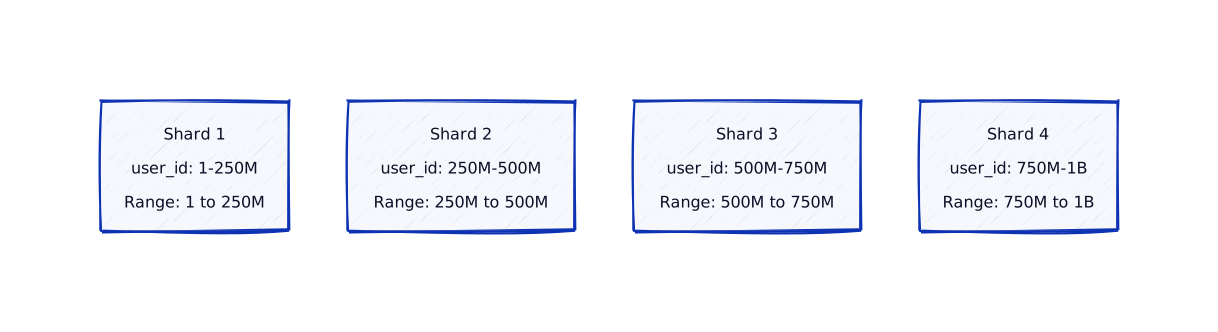
Section titled “Strategy 1: Range-Based Sharding”Range-based sharding partitions data by value ranges.
Pros:
- Simple to understand
- Easy range queries (e.g., “users 1-100”)
Cons:
- Can cause hotspots (if IDs are sequential)
- Hard to rebalance
Strategy 2: Hash-Based Sharding
Section titled “Strategy 2: Hash-Based Sharding”Hash-based sharding uses a hash function on the shard key to determine the shard.

Pros:
- Even distribution
- No hotspots
- Easy to add/remove shards
Cons:
- Hard to do range queries (need to query all shards)
- Hard to rebalance (need to rehash everything)
Strategy 3: Directory-Based Sharding
Section titled “Strategy 3: Directory-Based Sharding”Directory-based sharding uses a lookup table (directory) to map shard keys to shards.

Pros:
- Flexible (can move data easily)
- Easy to rebalance
- Can use any shard key
Cons:
- Single point of failure (directory)
- Extra lookup overhead
- Directory can become a bottleneck
Real-World Examples
Section titled “Real-World Examples”Major companies use sharding to scale their databases to handle billions of records:
Instagram: User-Based Sharding
Section titled “Instagram: User-Based Sharding”The Challenge: Instagram has billions of users and photos. A single database couldn’t handle the scale.
The Solution: Instagram shards by user ID:
- Shard key:
user_id - Distribution: Hash of user_id determines shard
- Scale: Thousands of shards, billions of records
Why User ID?
- Most queries are user-specific (user’s photos, followers, feed)
- Even distribution (user IDs are random)
- Single-shard queries (fast)
Example: User 12345’s data:
- Hash(user_id) % num_shards → Shard 7
- All user 12345’s photos, followers, posts in Shard 7
- Query user’s feed → Single shard query (fast)
Impact: Handles billions of users. Queries execute in milliseconds. Scales horizontally.
Twitter: Tweet Sharding
Section titled “Twitter: Tweet Sharding”The Challenge: Twitter generates billions of tweets. Need to store and retrieve tweets efficiently.
The Solution: Twitter shards tweets by user ID:
- Shard key:
user_id(for user’s tweets) - Additional: Separate shards for timeline generation
- Scale: Thousands of shards
Why User ID?
- Most queries: “Get user’s tweets”, “Get user’s timeline”
- Single-shard queries (fast)
- Even distribution
Example: User @elonmusk’s tweets:
- All stored in same shard (based on user_id)
- Timeline generation queries single shard
- Fast retrieval
Impact: Handles billions of tweets. Timeline generation fast. Scales to global scale.
Uber: Geographic Sharding
Section titled “Uber: Geographic Sharding”The Challenge: Uber operates globally. Need low latency for ride requests. Data residency requirements.
The Solution: Uber shards by geographic region:
- Shard key:
city_idorregion_id - Distribution: Each city/region has its own shard
- Benefit: Low latency, data residency compliance
Why Geographic?
- Most queries are city-specific (rides in NYC don’t need SF data)
- Low latency (data closer to users)
- Compliance (data stays in region)
Example: Ride request in New York:
- Query goes to NYC shard (low latency)
- Doesn’t query other city shards
- Fast response
Impact: Low latency for ride requests. Data residency compliance. Scales per region.
Amazon: Product Catalog Sharding
Section titled “Amazon: Product Catalog Sharding”The Challenge: Amazon has millions of products. Product catalog queries need to be fast.
The Solution: Amazon shards products by category:
- Shard key:
category_id - Distribution: Each category in different shard
- Scale: Hundreds of shards
Why Category?
- Most queries: “Show products in Electronics category”
- Single-shard queries (fast)
- Natural distribution
Example: Search for “laptops”:
- Query Electronics shard only
- Fast product listing
- Doesn’t query other category shards
Impact: Fast product searches. Handles millions of products. Scales horizontally.
Consistent Hashing: DynamoDB
Section titled “Consistent Hashing: DynamoDB”The Challenge: DynamoDB needs to add/remove shards dynamically without massive data movement.
The Solution: DynamoDB uses consistent hashing:
- Shard key: Partition key (hash determines shard)
- Rebalancing: Only ~1/N keys move when adding shard
- Scale: Automatically adds shards as data grows
Why Consistent Hashing?
- Minimal rebalancing (only affected keys move)
- No directory needed (direct hash calculation)
- Handles failures (failed shard’s keys redistribute)
Example: Adding new shard:
- Before: 4 shards, 1 billion keys
- After: 5 shards, ~200 million keys move (not all 1 billion)
- Minimal disruption
Impact: Seamless scaling. Minimal data movement. Handles failures gracefully.
Challenges of Sharding
Section titled “Challenges of Sharding”Challenge 1: Cross-Shard Queries
Section titled “Challenge 1: Cross-Shard Queries”
Solution: Design shard key to match query patterns. If queries are country-based, shard by country.
Challenge 2: Rebalancing
Section titled “Challenge 2: Rebalancing”When adding or removing shards, data must be rebalanced.

Solution: Use consistent hashing or directory-based sharding for easier rebalancing.
Challenge 3: Cross-Shard Transactions
Section titled “Challenge 3: Cross-Shard Transactions”
Solution: Use Saga pattern for distributed transactions, or design to avoid cross-shard operations.
LLD ↔ HLD Connection
Section titled “LLD ↔ HLD Connection”How sharding affects your class design:
Shard-Aware Repository
Section titled “Shard-Aware Repository”import hashlib
class ShardRouter: def __init__(self, shards): self.shards = shards # List of database connections self.num_shards = len(shards)
def get_shard(self, shard_key: int): # Hash-based sharding shard_index = shard_key % self.num_shards return self.shards[shard_index]
def get_shard_by_user_id(self, user_id: int): return self.get_shard(user_id)
class ShardedUserRepository: def __init__(self, shard_router): self.router = shard_router
def find_by_id(self, user_id: int): # Route to correct shard shard = self.router.get_shard_by_user_id(user_id) with shard.cursor() as cursor: cursor.execute("SELECT * FROM users WHERE id = %s", (user_id,)) return cursor.fetchone()
def save(self, user): # Route to correct shard shard = self.router.get_shard_by_user_id(user.id) with shard.cursor() as cursor: cursor.execute( "INSERT INTO users (id, name, email) VALUES (%s, %s, %s)", (user.id, user.name, user.email) ) shard.commit()
def find_by_country(self, country: str): # Cross-shard query - query all shards results = [] for shard in self.router.shards: with shard.cursor() as cursor: cursor.execute( "SELECT * FROM users WHERE country = %s", (country,) ) results.extend(cursor.fetchall()) return resultsimport java.sql.*;import java.util.*;
public class ShardRouter { private final List<Connection> shards; private final int numShards;
public ShardRouter(List<Connection> shards) { this.shards = shards; this.numShards = shards.size(); }
public Connection getShard(int shardKey) { // Hash-based sharding int shardIndex = shardKey % numShards; return shards.get(shardIndex); }
public Connection getShardByUserId(int userId) { return getShard(userId); }}
public class ShardedUserRepository { private final ShardRouter router;
public ShardedUserRepository(ShardRouter router) { this.router = router; }
public User findById(int userId) throws SQLException { // Route to correct shard Connection shard = router.getShardByUserId(userId); try (PreparedStatement stmt = shard.prepareStatement( "SELECT * FROM users WHERE id = ?" )) { stmt.setInt(1, userId); ResultSet rs = stmt.executeQuery(); if (rs.next()) { return mapToUser(rs); } } return null; }
public void save(User user) throws SQLException { // Route to correct shard Connection shard = router.getShardByUserId(user.getId()); try (PreparedStatement stmt = shard.prepareStatement( "INSERT INTO users (id, name, email) VALUES (?, ?, ?)" )) { stmt.setInt(1, user.getId()); stmt.setString(2, user.getName()); stmt.setString(3, user.getEmail()); stmt.executeUpdate(); shard.commit(); } }
public List<User> findByCountry(String country) throws SQLException { // Cross-shard query - query all shards List<User> results = new ArrayList<>(); for (Connection shard : router.shards) { try (PreparedStatement stmt = shard.prepareStatement( "SELECT * FROM users WHERE country = ?" )) { stmt.setString(1, country); ResultSet rs = stmt.executeQuery(); while (rs.next()) { results.add(mapToUser(rs)); } } } return results; }
private User mapToUser(ResultSet rs) throws SQLException { // Map result set to User object return new User(rs.getInt("id"), rs.getString("name"), rs.getString("email")); }}Deep Dive: Advanced Sharding Considerations
Section titled “Deep Dive: Advanced Sharding Considerations”Shard Key Selection: The Critical Decision
Section titled “Shard Key Selection: The Critical Decision”Choosing the wrong shard key can kill your system. Here’s what senior engineers consider:
Hotspot Problem
Section titled “Hotspot Problem”Problem: Uneven distribution creates hotspots (one shard overloaded).
Example:
- Bad shard key:
created_at(timestamp) - Result: All new data goes to one shard → hotspot
- Impact: That shard becomes bottleneck, others idle
Solution:
- Good shard key:
user_id(distributed evenly) - Better:
hash(user_id)for even distribution - Best: Composite key
(tenant_id, user_id)for multi-tenant apps
Production Example: Instagram
- Shard key:
user_id(notphoto_id) - Why: Most queries are user-specific (“show my photos”)
- Result: User’s data in one shard → fast queries
- Trade-off: Cross-user queries hit all shards (acceptable)
Query Pattern Analysis
Section titled “Query Pattern Analysis”Senior engineers analyze query patterns before choosing shard key:
Rule: Optimize shard key for 80% of queries, accept cross-shard for remaining 20%.
Consistent Hashing: Advanced Sharding Strategy
Section titled “Consistent Hashing: Advanced Sharding Strategy”Consistent hashing solves the rebalancing problem elegantly.
How it works:
- Map shards and keys to a hash ring
- Each key maps to the next shard clockwise
- Adding/removing shards only affects adjacent keys
Benefits:
- Minimal rebalancing: Only ~1/N keys move when adding shard
- No directory needed: Direct hash calculation
- Handles failures: Failed shard’s keys redistribute automatically
Production Example: DynamoDB
- Uses consistent hashing for partition key
- Partition count: Automatically scales (adds partitions as data grows)
- Rebalancing: Seamless, minimal data movement
- Performance: O(1) lookup, no directory overhead
Shard Rebalancing: Production Challenges
Section titled “Shard Rebalancing: Production Challenges”Challenge 1: Zero-Downtime Rebalancing
Section titled “Challenge 1: Zero-Downtime Rebalancing”Problem: Moving data between shards while serving traffic.
Solution: Dual-Write Pattern

Timeline: Typically 1-7 days depending on data size
Challenge 2: Handling Rebalancing Failures
Section titled “Challenge 2: Handling Rebalancing Failures”Problem: What if rebalancing fails mid-way?
Solutions:
- Checkpointing: Save progress, resume from checkpoint
- Rollback: Keep old shard until new shard verified
- Monitoring: Alert on rebalancing failures
- Automation: Retry with exponential backoff
Production Pattern:
class ShardRebalancer: def rebalance(self, old_shard, new_shard, key_range): checkpoint = self.load_checkpoint(key_range) for key in key_range: if key < checkpoint: continue # Skip already copied
try: # Copy data data = old_shard.read(key) new_shard.write(key, data)
# Save checkpoint self.save_checkpoint(key) except Exception as e: # Log and continue (will retry) self.log_error(key, e) # Can rollback if neededCross-Shard Query Optimization
Section titled “Cross-Shard Query Optimization”Strategy 1: Fan-Out Queries
Section titled “Strategy 1: Fan-Out Queries”Pattern: Query all shards in parallel, merge results.
Performance:
- Sequential: 4 shards × 50ms = 200ms total
- Parallel: max(50ms across shards) = 50ms total
- Improvement: 4x faster!
Code Pattern:
async def cross_shard_query(self, query): # Query all shards in parallel tasks = [shard.query(query) for shard in self.shards] results = await asyncio.gather(*tasks)
# Merge results return self.merge_results(results)Limitations:
- Cost: N queries instead of 1
- Latency: Limited by slowest shard
- Consistency: Results may be from different points in time
Strategy 2: Materialized Views
Section titled “Strategy 2: Materialized Views”Pattern: Pre-compute cross-shard aggregations.
Example:
- Base data: Sharded by
user_id - Materialized view: Aggregated by
country(updated periodically) - Query: “Users by country” → Query materialized view (single shard)
Trade-offs:
- Fast queries: Single-shard lookup
- Stale data: Updated periodically (eventual consistency)
- Storage: Extra storage for views
- Maintenance: Must keep views updated
Production Considerations: Real-World Sharding
Section titled “Production Considerations: Real-World Sharding”Consideration 1: Shard Size Limits
Section titled “Consideration 1: Shard Size Limits”Problem: How big should a shard be?
Industry Standards:
- PostgreSQL: ~100GB per shard (performance degrades after)
- MySQL: ~500GB per shard (with proper indexing)
- MongoDB: ~64GB per shard (recommended limit)
- Cassandra: ~1TB per node (but partitions within)
Why Limits Matter:
- Backup time: Larger shards = longer backup windows
- Query performance: Larger shards = slower queries
- Recovery time: Larger shards = longer recovery (MTTR)
Best Practice: Plan for growth. Start sharding before hitting limits.
Consideration 2: Geographic Sharding
Section titled “Consideration 2: Geographic Sharding”Pattern: Shard by geographic region.
Benefits:
- Latency: Data closer to users
- Compliance: Data residency requirements
- Disaster recovery: Regional failures isolated
Example: Multi-Region Setup
- US-East: US users
- EU-West: European users
- Asia-Pacific: Asian users
Challenges:
- Cross-region queries: High latency
- Data synchronization: Complex
- Consistency: Eventual across regions
Consideration 3: Shard Monitoring
Section titled “Consideration 3: Shard Monitoring”What to Monitor:
- Shard size: Alert when approaching limits
- Query distribution: Detect hotspots
- Cross-shard query rate: Optimize if too high
- Rebalancing status: Track progress
- Shard health: Detect failures early
Production Metrics:
class ShardMonitor: def collect_metrics(self): return { 'shard_sizes': {s.id: s.size() for s in self.shards}, 'query_distribution': self.get_query_distribution(), 'cross_shard_rate': self.get_cross_shard_rate(), 'hotspots': self.detect_hotspots(), 'rebalancing_status': self.get_rebalancing_status() }Performance Benchmarks: Sharding Impact
Section titled “Performance Benchmarks: Sharding Impact”| Metric | Single DB | 4 Shards | 16 Shards |
|---|---|---|---|
| Write Throughput | 5K ops/sec | 20K ops/sec | 80K ops/sec |
| Read Throughput | 10K ops/sec | 40K ops/sec | 160K ops/sec |
| Query Latency (single-shard) | 10ms | 10ms | 10ms |
| Query Latency (cross-shard) | N/A | 50ms | 200ms |
| Storage Capacity | 500GB | 2TB | 8TB |
Key Insights:
- Throughput scales linearly with shard count
- Single-shard queries: No latency impact
- Cross-shard queries: Latency increases with shard count
- Storage: Scales horizontally
Key Takeaways
Section titled “Key Takeaways”What’s Next?
Section titled “What’s Next?”Now that you understand relational databases and scaling, let’s explore NoSQL databases and when to use them:
Next up: NoSQL Databases — Learn about Document, Key-Value, Column-family, and Graph databases.