
UML Class Diagrams
Master UML notation and syntax for visualizing class structures.
UML (Unified Modeling Language) Class Diagrams are the foundation of object-oriented design. They help you visualize the structure of your system, understand relationships between classes, and communicate your design effectively.
What is a UML Class Diagram?
Section titled “What is a UML Class Diagram?”A Class Diagram shows:
- Classes - Blueprints for objects
- Attributes - Data/properties of classes
- Methods - Operations/behaviors of classes
- Relationships - How classes relate to each other
Why Learn UML Class Diagrams?
Section titled “Why Learn UML Class Diagrams?”- Design - Think through your system structure before coding
- Communication - Visual representation is clearer than text
- Documentation - Living documentation of your system
- Interviews - Essential for LLD (Low-Level Design) interviews
- Refactoring - Understand existing codebases better
Basic Class Diagram Elements
Section titled “Basic Class Diagram Elements”Class Structure
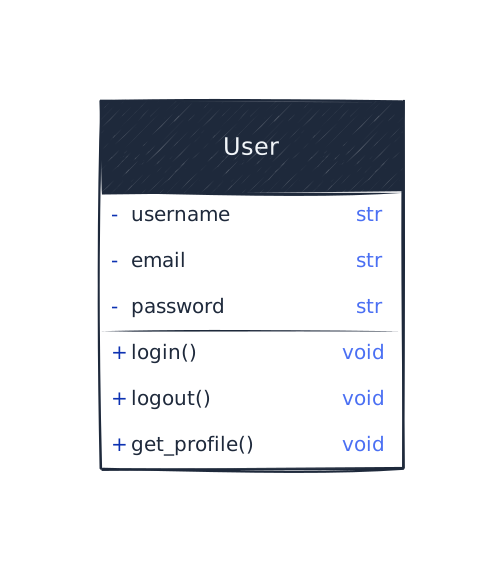
Section titled “Class Structure”A class in UML has three compartments:
- Name - The class name
- Attributes - Variables/properties (with visibility:
+public,-private,#protected) - Methods - Functions/operations
Visibility Modifiers
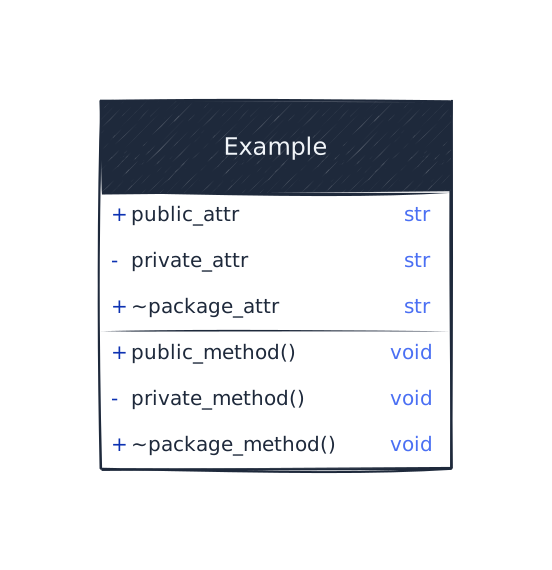
Section titled “Visibility Modifiers”UML uses symbols to indicate visibility:
- + Public - Accessible from anywhere
- - Private - Only accessible within the class
- # Protected - Accessible within class and subclasses
- ~ Package - Accessible within the same package (Java)
Multiplicity in Relationships
Section titled “Multiplicity in Relationships”Multiplicity shows how many instances participate in a relationship:
- 1 - Exactly one
- 0..1 - Zero or one (optional)
- 1..* or 1..n - One or more
- 0..* or 0..n - Zero or more
- * or n - Many (zero or more)
- m..n - Between m and n
Examples
Section titled “Examples”
UML Relationship Symbols
Section titled “UML Relationship Symbols”For detailed explanations of each relationship type, see the Class Relationships section.
Quick Reference
Section titled “Quick Reference”| Relationship | UML Symbol | Description |
|---|---|---|
| Inheritance | Solid line with hollow triangle | ”Is-a” relationship |
| Association | Solid line with arrow | ”Uses-a” or “Knows-a” |
| Aggregation | Solid line with hollow diamond | ”Has-a” (weak ownership) |
| Composition | Solid line with filled diamond | ”Has-a” (strong ownership) |
| Dependency | Dashed arrow | ”Uses temporarily” |
Visual Summary
Section titled “Visual Summary”
Reading UML Diagrams
Section titled “Reading UML Diagrams”When reading a UML class diagram:
- Start with classes - Identify all classes and their names
- Check attributes - Understand what data each class holds
- Review methods - See what operations each class can perform
- Analyze relationships - Understand how classes relate to each other
- Check multiplicity - See how many instances are involved
- Note visibility - Understand access levels
Drawing UML Diagrams
Section titled “Drawing UML Diagrams”Best Practices
Section titled “Best Practices”- Keep it simple - Don’t overcomplicate diagrams
- Use consistent notation - Follow UML standards
- Group related classes - Organize logically
- Show only essential details - Hide implementation details
- Use meaningful names - Clear, descriptive class and method names
- Document relationships - Add labels to clarify relationships
Complete Example: Simple E-Commerce System
Section titled “Complete Example: Simple E-Commerce System”
Key Takeaways
Section titled “Key Takeaways”Next Steps
Section titled “Next Steps”- Learn about Class Relationships - Detailed explanations of all relationship types
- Practice drawing UML diagrams for your own projects
- Use UML diagrams in LLD interviews to communicate your design
- Explore advanced UML features like interfaces, abstract classes, and packages
Remember: UML diagrams are a tool for communication and design thinking. Focus on clarity and correctness rather than perfect notation!